Why is your Google Ads budget disappearing without bringing in leads? You may get hundreds of clicks, but your phone does not ring and your contact form stays empty. It can feel like you are throwing money away.
The problem is not always your budget. Your keywords, bids, campaign settings or website may be causing the waste. In some cases, your ads reach people who have no plan to buy. In others, your website gets visitors but fails to turn them into customers.
As the founder of Qii Creative, I’ve seen accounts where a few small setup mistakes wasted a lot of money. And the business owner keeps paying for clicks. But no one is calling.
Google Ads can help you reach the right customers, but only when your campaigns are set up properly. A wrong setting here or a poor keyword choice there can eat into your budget before you know it.
In this guide, I’ll explain why your Google Ads budget runs out. You’ll learn where wasted clicks come from and what to check when your ads stop spending.
Why Is Your Google Ads Budget Disappearing?
Start with this table. Find the issue that sounds most like your account.
| What you notice | Possible cause | What to check |
| Budget runs out early | High click costs or broad targeting | Search terms and bids |
| Lots of clicks but no leads | Poor landing page or tracking | Forms, calls, and conversion tracking |
| Ads show for the wrong searches | Broad or loose keyword match | Search query report |
| Campaign spends too fast | Bid strategy or limited budget | Daily budget and bidding |
| Google Ads not spending | Low ad rank or account issue | Ad status, bids, and billing |
| Leads are poor quality | Weak buyer intent | Keywords and location settings |
Do not increase your budget until you know where your money goes. This is even more important if you have a limited budget and need every click to count.
QiiCreative helps businesses in Darwin and across Australia improve their digital marketing. Learn about our Google Ads agency in Darwin or request a Google Ads audit. If you need a second opinion on your account, our Darwin digital marketing agency offers a free audit.
Is Your Google Ads Budget Actually Overspending?
Before changing any settings, check if your campaign is actually spending too much.
Your daily budget is an average, not a fixed limit for every day. Google says that a campaign can spend up to twice its average daily budget on a busy day. It then balances the spend over the month.
For example, if your daily budget is $50, your monthly spending limit is generally based on $50 multiplied by 30.4.
So, a high daily cost does not always mean there is a problem.
Before making changes, check these points:
- Review Change History: Open Tools and Settings, then select Change History. Look for changes made by a team member, agency or automatic setting.
- Check the campaign age: A new search campaign needs time to collect useful data. Avoid making large changes after only one or two days.
- Know your lead value: Work out how much a new customer or lead is worth to your business.
- Review campaign performance: Look at leads and sales, not only clicks and impressions.
You should also check whether the account is tracking the right actions. If you do not know what one lead is worth, it is hard to judge your return on investment (ROI).
Are Your Keywords and Search Queries Wasting Money on Google Ads?
One common reason for wasted ad spend is showing ads for the wrong searches.
A search query is the phrase a person types into Google. Your ads may appear for searches that are related to your service but do not show buying intent.
For example:
- “Emergency plumber Darwin” may come from someone who needs help now.
- “How to fix a leaking tap” may come from someone looking for a free guide.
Both searches are about plumbing, but they have different goals.
This is why a lot of Google Ads campaigns waste money on irrelevant searches. A large budget on irrelevant traffic can leave little money for people who are ready to contact you.
How to Find the Search Terms That Waste Your Budget
Google gives advertisers a Search Terms report. It shows the searches that caused their ads to appear.
Follow these steps:
- Open your Google Ads account.
- Go to Insights and Reports.
- Select Search Terms.
- Sort the results by cost.
- Look for search terms with high costs but no conversions.
This helps you see what people search for before they click your ads.
Use Negative Keywords to Stop Irrelevant Clicks
You can add negative keywords to prevent your ads from showing for searches that do not fit your offer.
For example, a service business may want to block terms such as:
- Free
- Jobs
- DIY
- Tutorial
- Training
You should also review your keyword match types.
- Broad match: Reaches a wider group of related searches.
- Phrase match: Gives you more control over the searches that can trigger your ads.
- Exact match: Targets searches that closely match your chosen keyword.
Do not use the same match type for every keyword. Check your results and choose the best fit for each campaign.
Are Your Google Ads Account Settings Wasting Your Ad Spend?
Even good keywords can waste money when your settings are wrong.
Your Google Ads account has many options that control where, when and how your ads appear. Some ads come with default settings that may not fit your business goals.
Check Location Targeting and Your Ad Schedule
Location targeting controls where your ads can show.
For example, if you only serve Darwin, showing your ads across Australia can waste money.
Check the location option called Presence or interest. If you only want to reach people in or near your target area, choose the Presence setting.
Next, review your ad schedule.
If your team only answers calls from 9 AM to 5 PM, running call-focused ads late at night may not bring useful leads. Set your ads to run when your team can reply.
Review Your Campaign Networks and Other Settings
Check these settings:
- Search Partners: Review whether this network brings useful traffic.
- Display Network: Make sure it fits your campaign goal.
- Performance Max: Review placements and available exclusions.
- Auto-applied recommendations: Check suggested changes before you allow them.
When using Google Ads, never assume the default settings are right for every business. Review them based on your goals.
For local businesses in Darwin, a wide target area can spread a small budget too thin. Local customers may also use Google Maps to find services. Read our guide on why your business is not showing on Google Maps.
Is Your Bid Strategy Causing Google Ads to Spend Too Much?
Your bid strategy tells Google how to use your budget in ad auctions.
A poor choice can lead to high costs without enough leads. This is one of the common Google Ads mistakes that business owners should avoid.
Understand Smart Bidding and Automated Bidding
Smart Bidding is Google’s automated bidding system. It uses data and signals to set bids for each auction. It aims to help you get more conversions or better conversion value.
However, automated bidding is not a magic fix.
Google needs reliable conversion data to make better choices. Your tracking may be broken. Or your campaign may not have enough data. This can stop the system from working well.
Before using automated bidding, check your conversion settings. Make sure they work correctly.
When Should You Use Target CPA or Target ROAS?
Here are some common options:
| Bid strategy | How it works | What to watch |
| Maximise Clicks | Tries to get more clicks within your budget | Click quality |
| Maximise Conversions | Tries to get more conversions | Tracking accuracy |
| Target CPA | Aims for a chosen cost per action | Lead quality and data |
| Target ROAS | Aims for a chosen return on ad spend | Accurate revenue values |
You may use target CPA or target ROAS when your account has enough reliable data.
Don’t switch strategies only because they seem more advanced. First, give Google clean data and a clear goal.
Also, avoid bidding without a plan. Set a budget that fits your click costs and the value of a lead.
For example, if you spend AED 20 per day and each click costs AED 8, you may only get two or three clicks. One poor click could use almost half your daily budget.
Why Are Your Google Ads Clicks Not Turning Into Conversions?
Getting clicks is only the first step. Your website must turn those visits into calls, forms, bookings or sales.
If you are getting no leads, the problem may be on your website, even when your ads are bringing in visitors.
Check Whether You Set Up Conversion Tracking Correctly
Your conversion tracking set should measure actions that matter to your business.
These may include:
- Contact form submissions
- Phone calls
- Online purchases
- Booking requests
- Other useful enquiries
Check your setup in Google Ads, Google Tag Manager and Google Analytics 4 (GA4).
Make sure you count real actions, not page views alone. Use Google’s Tag Assistant to test your tracking tags.
Improve Your Ad Copy and Landing Page
Your ad copy and landing page should give visitors the same message.
For example, if your ad offers a 20% discount, your landing page should show that offer clearly. Visitors should not have to search for the deal they clicked to find.
Check these areas:
- Ad relevance: Does your ad match the search?
- Landing page: Does the page answer the visitor’s question?
- Page speed: Does your website load well on mobile?
- Contact form: Is it short and easy to use?
- Follow-up: Does your team reply to new leads quickly?
Google looks at three main factors when it calculates Quality Score:
- Expected click rate
- Ad relevance
- Landing page experience
A clear website can help turn more visitors into customers. Visit our website design and development service.
If your website gets little traffic, read why your website is not getting any traffic.
Remember, ads bring people to your website. But your page must give them a reason to contact you.
Google Ads Not Spending? Check These Common Causes
Sometimes the problem is not high spending. Your budget may remain unused if your ads get no impressions or clicks.
If Google isn’t spending your budget, check these common causes first. They may explain why your Google Ads campaign isn’t spending.
Common causes include:
- Paused ads: Your ads, campaigns, or ad groups may be paused.
- Disapproved ads: Check the policy status and fix any issues.
- Low ad rank: Your bids or ad quality may not be strong enough for your ads to appear.
- Low search volume: Your keywords may not have enough searches.
- Limited budget: Your budget may be too low for the competition.
- Billing issues: Check your payment method and account balance.
- Tight targeting: Your location, schedule, or audience settings may be too narrow.
Check Ad Approval, Bids and Search Volume
Open your Google Ads account and check the ad status column.
Make sure Google approves your ads.. If Google has disapproved an ad, read the reason and make the required changes.
Next, review your bids and Ad Rank. A low ad rank may stop your ads from entering enough auctions.
You should also check whether your keywords have enough search volume. If only a few people search for them, your ads may not get enough impressions.
This can explain why your budget won’t be spent in full.
Check Paused Campaigns and Billing
Look for paused ads, campaigns or ad groups. Make sure the right items are active.
Then check your payment details. A billing issue can stop your ads from running.
Don’t widen your targeting only to use up your budget. The aim is to reach the right people, not to use every dollar.
Are Fake Clicks Increasing Your Paid Ads Spend?
Invalid traffic can include accidental clicks and automated bot activity. It can affect paid ads on platforms such as Google Ads and Meta Ads.
Lunio’s 2026 Global Invalid Traffic Report reported that 8.51% of paid traffic was invalid. That is about one in twelve clicks.
Google filters many invalid clicks and may issue credits for eligible activity.
You can check invalid traffic in Google Ads:
- Open Campaigns.
- Go to Columns.
- Add Invalid Clicks.
- Add Invalid Click Rate.
- Review the data.
Fake clicks are worth checking, but they are not always the main cause of poor results from Google Ads.
Focus on your keywords, settings, tracking and landing page first.

Your Google Ads Budget Recovery Audit: 6 Steps to Reduce Wasted Spend
Before you increase your budget, run this simple audit.
| What to do | Why it matters |
| Check the Search Terms report | Find irrelevant searches |
| Add suitable negative keywords | Reduce wasted clicks |
| Review location settings | Reach the right customers |
| Test calls and contact forms | Confirm tracking works |
| Review bids and daily budget | Control spending |
| Check landing page quality | Turn more clicks into leads |
Make one change at a time where possible. Then review the results. This helps you understand which change improved or reduced performance.
Do not let Google make every choice without your review. At the same time, do not change your settings every day. Give Google enough time to collect useful data.
Spend your budget on searches and visitors who are more likely to become customers.
When Should You Get Professional Google Ads Help?
Running ads takes time and regular checks. You may need expert help if:
- Your budget disappears, but you do not know why.
- You get clicks but few leads.
- You cannot work out your cost per lead.
- Your Google Ads and GA4 reports show different numbers.
- You can’t review search terms every week..
- Your campaign has no clear bidding or tracking plan.
Ask any agency how it manages keywords and negative lists. Also ask about bids, landing pages and call tracking.
Do not choose an agency based only on promises. Ask how it measures results and explains campaign changes.
Frequently Asked Questions About Google Ads Budget and Spending
Why does my Google Ads budget run out so fast?
Your budget may run out due to broad match keywords, high bids or poor targeting. Check your Search Terms report and review your campaign settings.
Why is Google Ads not spending my full budget?
Your campaign may have low search volume, low bids, disapproved ads or tight targeting. Check your ad status, keywords and billing details.
Is it normal for Google to spend more than my daily budget?
Yes. Google may spend up to twice your average daily budget on busy days. Your monthly spending limit still applies.
How can I reduce wasted money on Google Ads?
Check your search terms and add negative keywords. Improve location targeting and review your bid strategy. Test your conversion tracking. Make sure your landing page matches your ad copy.
Does Smart Bidding always improve campaign results?
No. Smart Bidding needs reliable conversion data. If your tracking is wrong or your campaign has little data, results may not meet your goals.
Fix the Problem Before Increasing Your Ad Budget
Your Google Ads budget runs out, but you get no leads. Spending more won’t fix the problem.
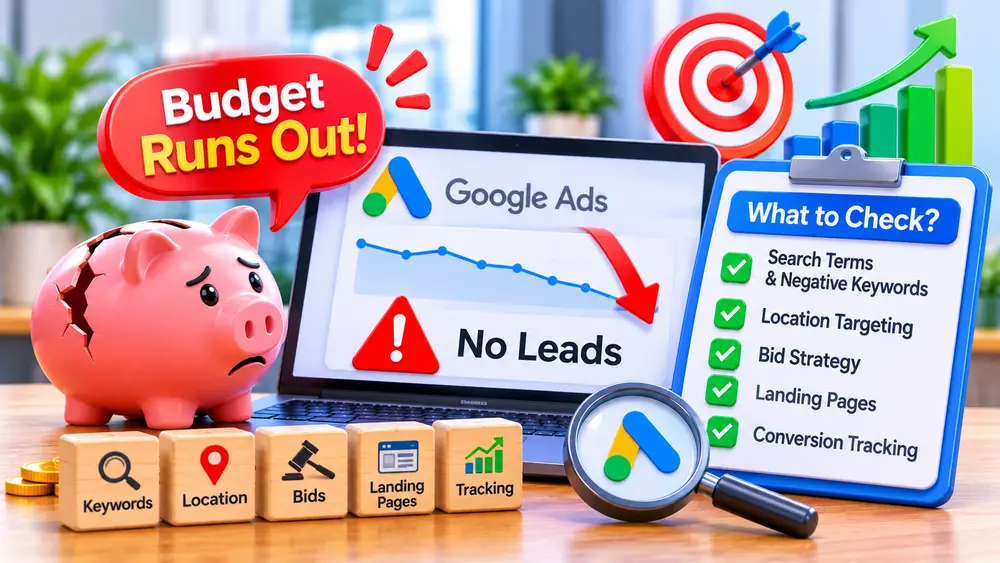
Start by checking where your money goes. Review your keywords, match types, location targeting, bid strategy and conversion tracking. Then make sure your landing page gives visitors a clear reason to contact you.
The goal is not to get the most clicks. It is to get more valuable leads and customers from your ad spend.
If you need help finding the problem, contact Qii Creative and request a Google Ads audit. Let’s find the gaps and make better use of your budget.